Home       |       Manufacturers       |       Resources       |       Storefront       |       FAQs       |       About      

repair stories

• • • • • • • • •


AMPS

Ampeg
  SVT Classic Shuts Off
Fender
  DeVille Input Jack
  Mini-Twin Conversion
  Super Twin Inspection
Kay
  703-C Filter Caps
Marshall
  DSL100 Choke & Bleed
Peavey
  6505+ Tube Filaments
  Classic-30 Repair
Selmer
  Little Giant Mk 3
Vox
  Valvetronix AD50VT

KEYBOARDS

Akai
  MPC2000XL Jog Wheel
Farfisa
  Mini Compact Dividers
Korg
  01/W Keybed Removal
  M1 Worn-Out Buttons
  Poly-61 Envelopes
  Triton Disassembly
  Triton Worn-out Buttons
  X3 Worn-out Buttons
  X3 Floppy Drive
  Keys & Contacts:
    M1, 01W, triton, i30 ...

Moog
  Micromoog Repair
  Prodigy Key Contacts
  Rogue Power Jack
Roland
  D-50 Key Contacts
Sequential Circuits
  Pro-One Key Contacts
Yamaha
  MOTIF6,7 Disassembly
  MOTIF Worn-out Buttons
  Keys & Contacts:
    motif, es, DX7, sy85 ...

TECHNIQUE

  IC Socketing
  Sustain Pedal Plugs


Korg® X3    Broken Buttons

Korg X3 Knob Block and Switches
Click to Enlarge Photo
CLICK TO ENLARGE

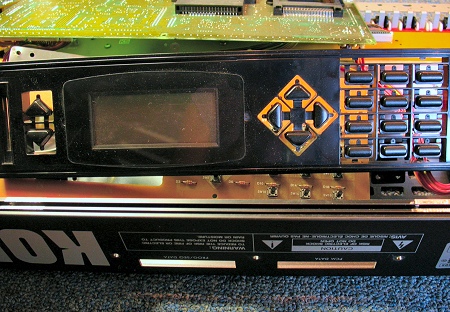
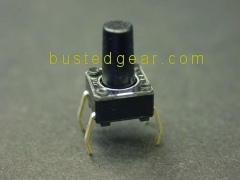
Worn out switches make the buttons of your Korg X3 difficult to use.  The buttons that you use most will eventually stop responding completely.

Only basic soldering skills are required to install new switches but you must be handy with a screwdriver.

While you're in there, it makes sense to change any dodgy switch.

Buy 'em by the sack!

Quantity

Buy Tactile Switches for the Korg X3 here.

These switches also fit the Korg X2, X5, T1, T2, T3, M1, 01/W, 01/W-FD, N264, N364, i2, i3, Trinity, Trinity plus, Trinity pro, Wavestation W1, Wavestation A/D, and microKORG keyboards.

 FREE SHIPPING WORLDWIDE

Click Here for Tactile Switch Buyer Comments

IF A RUBBER KEY-CONTACT STRIP NEEDS REPLACING:

Check this parts notice.

IF A KNOB BLOCK IS BROKEN:

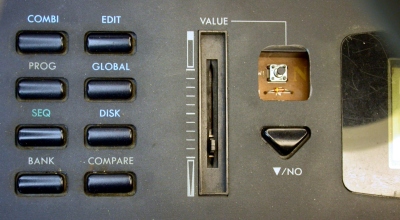
Missing YES Knob

The knob blocks are no longer available but, if you're desperate, all isn't lost.

1.  Disassemble the X3 and move the PC boards away from the front panel (see "Full Story", above).

2.  Get a Dremel® rotary tool with a tungsten-carbide cutter accessory.

3.  Enlarge the hole so your finger can reach through and operate the tactile switch.

4.  Burnish the hole's edges and clean up all the metal shavings.

Korg® is a registered trademark of   KORG® INC.

Home       |       Manufacturers       |       Resources       |       Storefront       |       FAQs       |       About      

Page design and content Copyright © Richard Diemer - All rights reserved