Home       |       Manufacturers       |       Resources       |       Storefront       |       FAQs       |       About      

repair stories

• • • • • • • • •


AMPS

Ampeg
  SVT Classic Shuts Off
Fender
  DeVille Input Jack
  Mini-Twin Conversion
  Super Twin Inspection
Kay
  703-C Filter Caps
Marshall
  DSL100 Choke & Bleed
Peavey
  6505+ Tube Filaments
  Classic-30 Repair
Selmer
  Little Giant Mk 3
Vox
  Valvetronix AD50VT

KEYBOARDS

Akai
  MPC2000XL Jog Wheel
Farfisa
  Mini Compact Dividers
Korg
  01/W Keybed Removal
  M1 Worn-Out Buttons
  Poly-61 Envelopes
  Triton Disassembly
  Triton Worn-out Buttons
  X3 Worn-out Buttons
  X3 Floppy Drive
  Keys & Contacts:
    M1, 01W, triton, i30 ...

Moog
  Micromoog Repair
  Prodigy Key Contacts
  Rogue Power Jack
Roland
  D-50 Key Contacts
Sequential Circuits
  Pro-One Key Contacts
Yamaha
  MOTIF6,7 Disassembly
  MOTIF Worn-out Buttons
  Keys & Contacts:
    motif, es, DX7, sy85 ...

TECHNIQUE

  IC Socketing
  Sustain Pedal Plugs


Akai MPC2000XL    Jog Wheel Repair

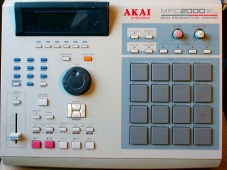
Jog Wheel Encoder MIDI Production Center
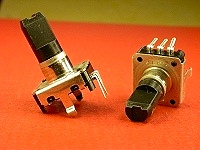
Encoder Close-Ups
CLICK TO ENLARGE

A bad jog wheel on the Akai MPC2000XL will cause settings to jump around unevenly, or not to change at all.

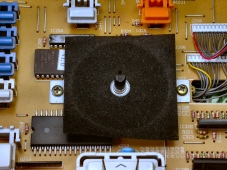
The circuit component (left) that translates the wheel's rotation into on-off signals for the computer is a rotary encoder.

The jog post, or stem, can work loose and pull out of the encoder's frame.

Fortunately, installing a replacement encoder isn't a huge deal.

Quantity:

  Buy the Akai MPC2000XL Encoder


  FREE SHIPPING WORLDWIDE


Encoder Buyer Comments

Additional Resources:

Akai Pro Support
Downloadable Manuals at MPCsounds.com

For more MPC2000 info, visit Akai Professional®


Akai Professional® is a registered trademark of Numark Industries, LLC.

Home       |       Manufacturers       |       Resources       |       Storefront       |       FAQs       |       About      

Page design and content Copyright © Richard Diemer - All rights reserved